

Torque Hinge Drift: Distinguish Torque Decay from Door Sag
A positioning panel held its angle when the machine shipped. Now it starts moving shortly after the operator releases it. Replacing the torque hinge may look like the obvious response, but the visible movement does not identify the failed part. The hinge may have lost output. The panel load may have changed. A cable harness may be pulling through part of the travel. The mounting structure may have shifted. Or the complete door may be dropping while the hinge torque remains usable.
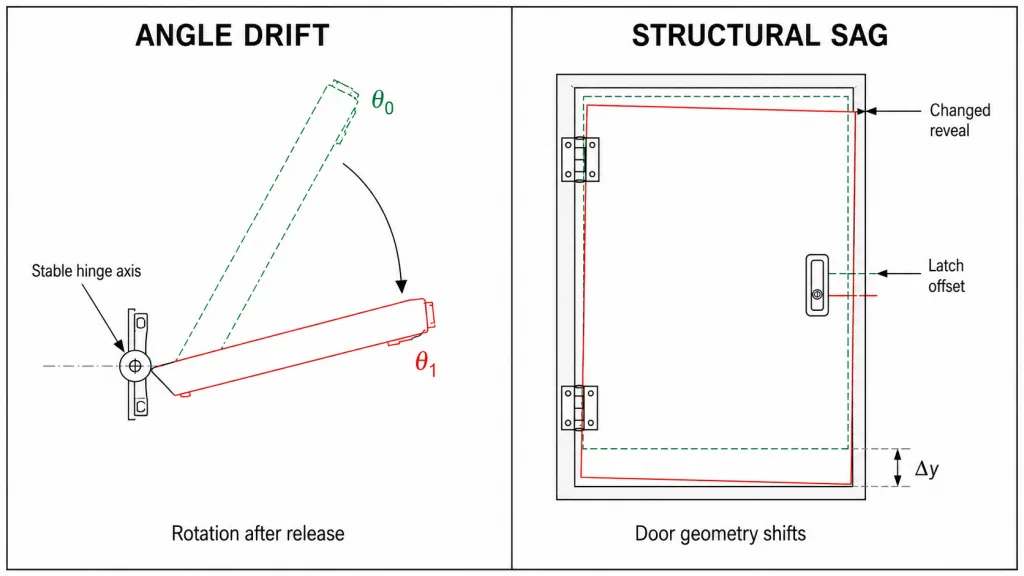
Those conditions can all be described informally as “torque hinge sagging.” They are not the same engineering problem. This page uses torque hinge drift for unintended angular movement after release and reserves door sag for a physical change in the door, hinge line, frame, or mounting geometry.
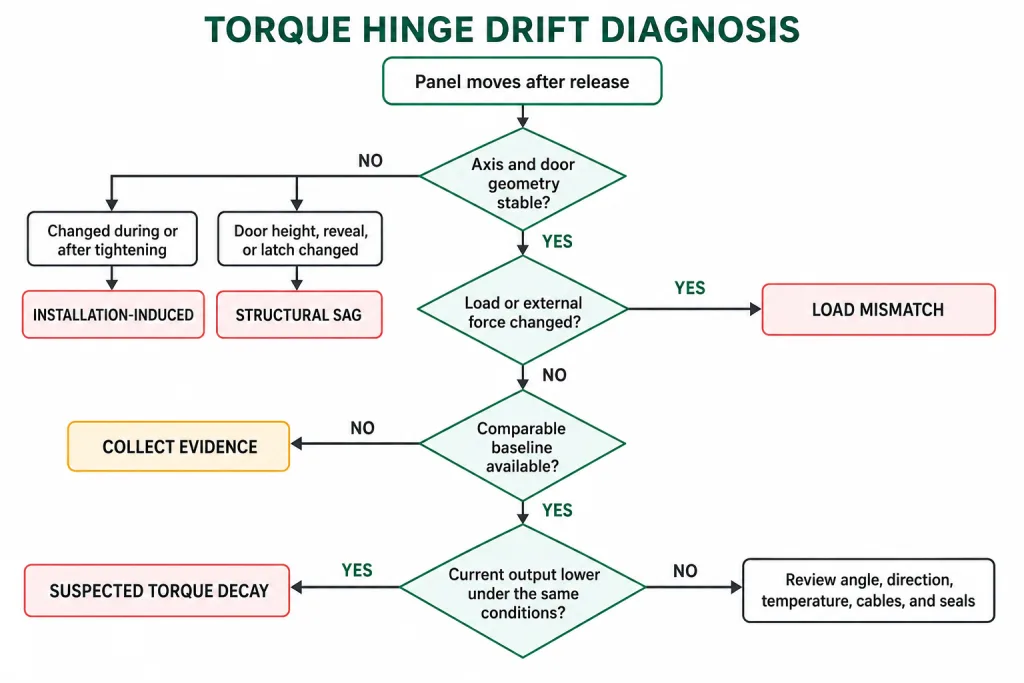
Diagnostic rule: Do not call a failure torque decay until the panel is rotating around a stable hinge axis, the applied load condition is understood, and current holding behavior can be compared with a defined reference. If the hinge line or door geometry has moved, solve that structural problem first.
Name the Motion First
The first useful observation is not “the hinge feels weak.” It is what the moving member does after the hand force is removed. A slow rotation, a short rebound, a loose angular band, and a downward shift of the entire door point toward different evidence. Treating them as one symptom leads to unnecessary adjustment and replacement.
| Observed behavior | Engineering description | What it suggests | What it does not prove |
|---|---|---|---|
| Panel continues rotating in one direction after release | Angular drift around the pivot | The required external moment exceeds the available static holding torque at that angle | It does not prove that the hinge itself has worn |
| Panel moves back a small amount, then remains stable | Elastic springback | Cable, seal, latch, housing, or bracket recovery may be returning stored energy | It is not automatically continuous torque loss |
| Panel moves through a loose band before resistance begins | Backlash or connection clearance | Play may exist in the shaft connection, fasteners, bracket, holes, or surrounding structure | Free play and holding torque are separate characteristics |
| Motion is rough, intermittent, or different by direction | Binding, stick-slip, or directional imbalance | Axis error, leaf distortion, friction instability, or an external side load may be present | A rough hinge is not necessarily a low-torque hinge |
| Door height, reveal, or latch position changes | Structural door sag | The load path, mounting point, frame, or hinge geometry has shifted | This is not diagnosed from torque output alone |
Observe the panel from a fixed reference, not only from the operator’s viewpoint. A camera aligned with the hinge axis can show angular movement; a second view of the door edge, reveal, and latch can expose vertical displacement. If only one view is recorded, rotation and translation are easy to confuse.
Axis orientation changes the diagnosis. On a lid, display, or HMI rotating about a horizontal axis, gravity normally creates a moment about that axis. On a side-opening door with a vertical hinge axis, gravity acts mainly as a vertical structural load and does not create the same opening or closing moment about an ideally plumb axis. If a vertical-axis door swings after release, inspect hinge-axis tilt, cables, seals, wind, latches, and other applied forces; if the door drops or the reveal changes, route it to structural sag.
Start at the Hinge Axis
A torque hinge can only be judged cleanly after its installation geometry is shown to be stable. The axis does not need to be measured with laboratory equipment for the first screening, but the inspection must use fixed references. Look for witness-mark movement at the leaves, changing gaps around the panel, a shifted latch relationship, fastener heads that have moved against their seats, or a bracket that flexes as the panel is released.
- Support the moving member safely. Do not perform a hands-off drift observation where an unsupported cover can fall onto personnel, wiring, tools, or adjacent equipment.
- Choose fixed references. Use the frame, a mounting datum, the hinge centerline, the door reveal, and the latch position. A mark on the moving panel alone cannot distinguish rotation from structural movement.
- Release from a defined angle. Record direction, approximate angle, and whether the movement is continuous, delayed, intermittent, or limited to a small recovery.
- Watch the mounting zone. Leaf lift, bracket flex, hole movement, coating compression, or a changing gap means the installed structure is participating in the symptom.
- Stop the torque-decay branch if geometry moves. A changing axis or door position must be routed to mounting or structural review before the hinge’s internal output is blamed.
A door that drags at the bottom edge, changes its reveal, or requires lifting to engage the latch belongs to the broader hinge sag diagnosis. This article continues only when unintended angular movement remains after that structural branch has been separated.
The Failure Timeline Is Evidence
When the problem began can eliminate entire root-cause branches. “It drifts now” is too little information. “It held during prototype review, drifted after the final display module was installed, and has behaved the same since” is actionable. So is “the motion changed immediately after the mounting screws were tightened.”
| Failure timing | Stronger candidate | Evidence to seek next |
|---|---|---|
| Present on the first complete assembly | Initial load mismatch, torque-direction error, incomplete specification, or installation condition | Released hinge configuration, panel mass, center of gravity, orientation, hinge quantity, and assembly geometry |
| Appeared when final fasteners were tightened | Leaf pull-in, axis error, bracket distortion, or fastener-stack movement | Before/after motion, leaf seating, mounting datum, and common-axis evidence |
| Appeared after a screen, handle, cover, cable, seal, or accessory changed | Higher or differently distributed external moment | Final assembly mass, new center of gravity, cable routing, gasket load, and angle-specific behavior |
| Developed gradually under otherwise unchanged service conditions | Suspected torque decay, progressive joint movement, or structural settling | Initial reference, current torque evidence, witness marks, service history, and temperature condition |
| Occurs only when hot, cold, or after a temperature soak | Condition-dependent friction or external system force | Temperature at observation, dwell time, torque direction, material expansion, seal and cable behavior |
| Started suddenly after impact, overload, jam, or abnormal noise | Structural damage, fastener movement, retention failure, or component damage | Remove the assembly from normal use and inspect before any adjustment |
Cycle count can support the timeline only when it was actually recorded. An estimated number based on machine age is not equivalent to a counter, maintenance record, or controlled test. If the history is unknown, state that limitation. “Suspected in-service torque loss” is defensible; a numerical decay claim is not.
Torque Loss or More Load?
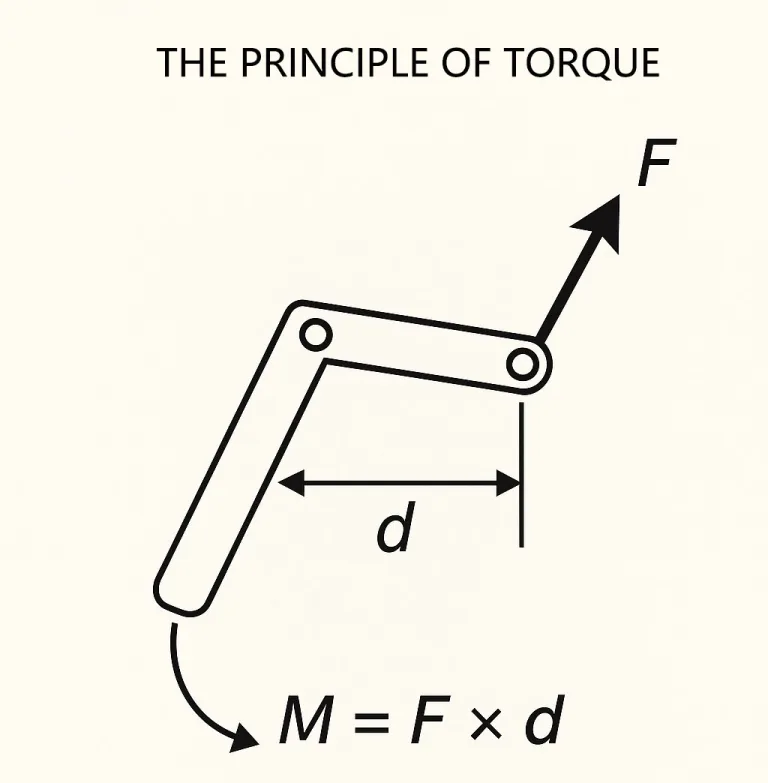
A panel can remain at rest while the magnitude of the net external moment does not exceed the available static holding torque of the installed hinge system. Drift begins when the required resisting moment exceeds that available limit at the observed condition. The symptom alone cannot tell which side changed.
Hold condition: |Mexternal(θ)| ≤ ΣTstatic, available, i(θ, direction, temperature, time)
Mexternal(angle) = Σ signed moments from gravity, cables, seals, latches, and other applied forces
These relationships are diagnostic, not a substitute for a complete selection calculation. They show why two different changes create the same visible result. True torque decay lowers Tavailable. A heavier display, a shifted battery, a longer cover, a rerouted cable, or a new seal increases or redistributes Mexternal. In both cases, the panel moves after release.
The middle-angle conflict
A nominal hinge value can be correct and the finished panel can still drift through part of its travel. Gravity moment changes with orientation. A cable loop may add little force near closed, pull most strongly through the middle, then relax near fully open. A gasket or latch can stabilize an endpoint while providing no help between endpoints. Testing only closed and fully open positions can therefore miss the angle that controls the design.
Consider an HMI that held its original display but began drifting after a heavier touch module and revised cable shield were installed. The same hinge model may still meet its released component specification. The assembly requirement changed. Replacing it with another unit of the same nominal torque would reproduce the problem; calling the condition “wear” would misdirect the corrective action. This is an illustrative engineering scenario, not a customer project record or product test claim.
If the issue existed on the first complete assembly or followed a load change, return the mass, center-of-gravity distance, orientation, required hold angles, and hinge quantity to the torque hinge selection review. This page does not assign a new torque value.
What Current Torque Evidence Can Prove
Torque decay is a change relative to a reference. Without an original value, test curve, approved sample, or controlled comparison unit, the present hinge can be described as unable to hold the current assembly—but not as having lost a specific amount of torque.
- A useful reference identifies the hinge, torque direction, angle or travel range, measurement method, speed, temperature, conditioning, and whether the value came from one hinge, a pair, or the complete assembly.
- A current system observation shows whether the complete panel holds at defined angles under the final load. It includes cables, seals, brackets, panel stiffness, fasteners, and paired-hinge interaction.
- A component measurement can help determine whether hinge output changed, but only when the current method is comparable with the reference method.
Do not mix test boundaries. A loose hinge measured on a bench and a complete panel observed in the machine are different systems. The installed result includes gravity, alignment, joint movement, cables, seals, and structural compliance. A difference between those results is not automatically measurement error.
If comparable evidence shows that hinge output has fallen while load and geometry remain controlled, route the technical cause and prevention discussion to the torque-decay guide. Internal friction-pair wear, preload change, material behavior, and life-test interpretation belong there, not in this diagnostic page.
Direction, angle, and dwell
A torque value without its observation conditions is weak diagnostic evidence. The same assembly can stop differently depending on whether the panel approached the release angle while opening or closing. That difference may reflect directional hinge behavior, elastic recovery in a cable or seal, joint play being taken up, or friction that changes after motion stops. Record the approach direction instead of averaging the two behaviors into one description.
Angle matters for both sides of the balance. The panel’s gravitational moment varies with its orientation, while cables, gaskets, latches, and stops can add forces only through part of the travel. A hinge may therefore appear acceptable at the bench angle used in a supplier record yet fail at the assembly’s controlling angle. The comparison must use the same angle convention and the same installed orientation.
Dwell separates immediate rebound from continuing drift. A panel that returns slightly and stops is behaving differently from one that keeps moving under gravity. Record when movement begins and whether its rate changes. Do not create a universal waiting time from this article; the observation period must reflect the product’s functional requirement and any existing test method.
Temperature belongs in the record even when the article is not performing an environmental qualification. Temperature can affect hinge output, seal stiffness, cable flexibility, lubricant behavior, and clearances at the same time. A room-temperature reference cannot prove decay in a cold or heat-soaked assembly unless the relationship between those conditions is already defined.
When no baseline exists, use a controlled comparison rather than an invented acceptance band. A retained approved sample or an unused unit from the same released configuration may help, provided model, direction, adjustment state, manufacturing revision, and test method are comparable. Supplier Confirmation Required applies if those conditions cannot be established.
Installation Can Imitate Decay
Installation-induced drift is not limited to visibly loose screws. Two leaves can sit flat individually but shift the common pivot when both are tightened. Clearance holes can allow the hinge to move before clamp load is established. A thin bracket can bend under the hinge reaction. Coating or a raised hole edge can create a soft joint that settles after initial use. In a two-hinge system, small axis differences can make one unit carry motion and side load that were never present in the component test.
Evidence that points back to assembly
- The panel moved smoothly before final tightening but binds or drifts afterward.
- Opening effort or holding behavior differs by direction.
- One side starts moving before the other, or the panel twists across its width.
- Witness marks show leaf, washer, slot, or fastener movement.
- The hinge feels acceptable off the assembly but changes after mounting.
- The symptom changes when the frame is anchored, a cover is fitted, or adjacent fasteners are tightened.
What a two-hinge assembly can hide
Two nominal torque values can be added for a preliminary load balance, but that arithmetic does not prove that both hinges contribute as intended. One hinge may take up internal or mounting clearance before it contributes its expected resisting torque. A direction-specific or one-way hinge may also be installed against its intended torque direction. The panel or bracket may twist before both hinges share motion as intended. If the axes are not common, part of the measured effort is spent deforming the assembly rather than resisting gravity.
This can produce a misleading combination: high hand force during movement and poor holding after release. Calling the assembly “too weak” and installing higher-torque units may increase the side load without removing the axis conflict. Look for panel twist, delayed motion on one side, unequal witness marks, directional differences, and a symptom that appears only after both leaves are fully clamped.
Do not remove one loaded hinge merely to see whether the other behaves better. That can transfer an unreviewed moment into the remaining hinge and its mounting points. Any component-isolation test needs a supported panel, a defined fixture, and an engineering plan appropriate to the assembly.
These observations do not identify the exact tolerance or fastener correction. They establish that the installation boundary is involved. Use the released drawing and the torque hinge installation and alignment guide for the common-axis, leaf-seating, fastener, and final functional checks.
Do not compensate for moving geometry by simply increasing adjustable torque. Higher preload may temporarily stop the panel while increasing user force and the reaction carried by the same unstable mount. Once the joint settles again, the symptom can return. Correct the load path before tuning the position-control output.
Torque Hinge Drift: Evidence and Next Action
Use the strongest observable pattern, not the most convenient replacement. Several rows may apply at first. The next action should narrow the boundary until one branch remains defensible.
| Observed pattern | Most defensible classification | Evidence still needed | Next action |
|---|---|---|---|
| Slow one-direction drift; hinge axis and reveals stable; load unchanged; behavior worsened progressively | Suspected torque decay | Comparable initial and current torque or hold-angle evidence under defined conditions | Review torque retention; do not assign an internal cause without component evidence |
| Slow drift from the first complete build; geometry stable | Initial torque/load mismatch or angle-range conflict | Final mass, center of gravity, orientation, external forces, required angles, and released hinge data | Return to selection review rather than a wear investigation |
| Drift started after an accessory, cable, seal, screen, or cover changed | Changed external moment | Before/after mass distribution and angle-specific system forces | Update the complete-assembly load case |
| Behavior changed during tightening or differs strongly by direction | Installation-induced condition | Leaf seating, common axis, bracket stiffness, fastener movement, and before/after assembly behavior | Correct the assembly boundary before measuring decay |
| Door height, reveal, or latch relationship changed | Structural door sag | Mounting-zone, frame, substrate, pin, and load-path inspection | Route to structural sag diagnosis |
| Small rebound, then stable holding | Elastic recovery from an external element | Cable loop, gasket, latch, stop, housing, and bracket behavior through travel | Isolate the restoring force; do not classify it as continuous torque decay |
| Loose angular band followed by normal resistance | Backlash or connection clearance | Which interface moves before the hinge friction engages | Inspect shaft connection, fasteners, holes, brackets, and retention features |
| Drift occurs only at a temperature condition | Condition-dependent output or system load | Temperature, dwell, direction, angle, seals, cables, and supplier torque data for that condition | Request project-specific environmental evidence |
| Sudden drop, cracking, popping, visible deformation, or retention movement | Potential structural or component damage | Controlled inspection after the assembly is made safe | Stop normal use; do not attempt to mask the symptom by adjustment |
The matrix does not turn observations into automatic root-cause proof. It tells the engineer which evidence deserves attention next. Final disposition may still require a component comparison, drawing review, or complete-assembly test under project-specific conditions.
Change one boundary at a time. Tightening fasteners, increasing adjustable torque, rerouting a cable, and removing an accessory in one trial may stop the drift, but the result cannot identify which change corrected it. Preserve the initial condition, document each controlled change, and repeat the same release observation before moving to the next branch.
Prove the Symptom Is Gone
A correction is not verified because the panel holds at one convenient angle. Repeat the condition that exposed the failure: the same final panel, accessories, cable routing, orientation, release direction, temperature state, and relevant hold angles. If the original problem appeared only after a dwell or only when approaching from one direction, include that condition in the repeat observation.
- Record the defined release angles and the observation period used by the project.
- Approach each angle from the direction that originally produced drift; test the opposite direction if directional behavior matters.
- Watch the hinge axis, leaf seating, reveal, latch relationship, and panel angle at the same time.
- Use the final hinge quantity, fasteners, brackets, seals, cables, and panel accessories.
- Record user movement effort separately from static holding. A panel can hold and still be unacceptably difficult to reposition.
- Use project-defined acceptance limits. This article does not create a universal drift angle, dwell time, or torque-retention percentage.
If changing the hinge appears to solve the symptom, retain the removed unit and the before/after records until the failure branch is confirmed. Otherwise, a replacement that happened to have higher output can hide an unresolved load or mounting problem.
Build a Reviewable Evidence Pack
A supplier cannot distinguish torque decay from changed load or structural movement from a close-up photograph of the hinge alone. The useful package connects the symptom to the complete moving system.
- Equipment or assembly identifier
- Hinge model, revision, quantity, handedness, and torque direction
- Factory-set or adjustable status and any recorded adjustment
- Panel drawing or dimensions relevant to the pivot and center of gravity
- Final assembly mass, not bare panel mass
- Attached displays, handles, insulation, covers, cables, seals, and latches
- Release-angle video with a fixed reference in view
- Photos of both hinge leaves, fasteners, brackets, reveals, and latch
- When the symptom began and what changed immediately beforehand
- Initial approved sample, torque record, or comparison-unit information
- Operating temperature and any relevant dwell condition
- Recorded cycle or service history, if available
- Impact, overload, jam, noise, or previous repair history
- Actions already attempted and whether they changed the symptom
Mark uncertain fields as To Be Confirmed instead of estimating them. A preliminary diagnosis can identify the most likely branch. Engineering review determines what evidence remains missing. Sample or production approval is a separate task and is not created by this troubleshooting record.
Questions That Change the Diagnosis
Is torque hinge drift the same as backlash?
No. Drift is continuing angular movement after release because the external moment exceeds the available static holding torque. Backlash is a loose angular band before the resisting interface or connection engages. A panel can have backlash without continuing to drift, or it can exhibit both conditions.
Can a vertical-axis door drift even though gravity does not create the same opening moment?
Yes. A vertical-axis door can rotate after release if the hinge axis is not plumb or if cables, seals, wind, latches, or another applied force create a moment about the axis. Door drop, changing reveals, and latch misalignment should still be treated as structural sag rather than torque decay.
Can an adjustable torque hinge simply be tightened until drift stops?
Only after the released hinge instructions, adjustment range, lock method, load condition, and mounting stability are confirmed. Increasing preload can mask a moving joint or changed load, raise user force, and increase reaction at the hinge mount. Fixed-torque hinges should not be modified as though they were adjustable.
Torque hinge drift is a symptom category, not a component verdict. A stable axis, unchanged load, controlled observation, and comparable reference are what move the diagnosis toward true torque decay. Changed geometry routes the problem toward installation or structural sag. Changed external moment routes it back to the complete load case. Keeping those boundaries separate prevents the replacement hinge from becoming a temporary mask for the real failure.
Share the Drift Evidence, Not Just the Hinge Photo
Send the hinge model, panel drawing, final assembly mass, approximate center of gravity, release-angle video, hinge-line photographs, failure timeline, and any initial torque or approved-sample record. That package allows the next review to identify whether selection, installation, structural movement, or hinge-condition evidence is still missing before replacement hardware is specified.
Share Photos and Failure Details

 English
  한국어
한국어  Русский
  Español
  Italiano
  Deutsch
  Français
  Português